🍓 ARM / Pi (Ainur)
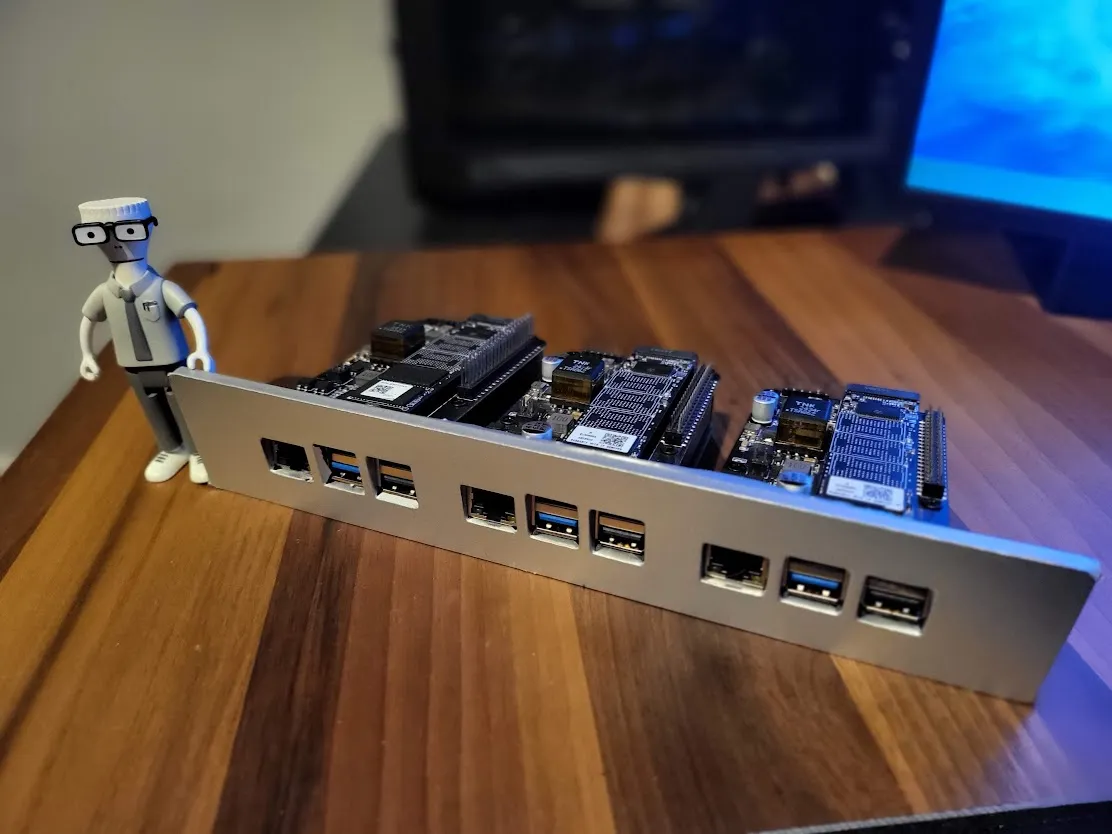
Milo didn’t do networking in college, but I did
A mistake I’ve made in the past is having one big server with everything on it, meaning a single point of failure for everything.
To avoid this happening this time around, I wanted to build not only completely separate clusters for certain workloads, but also ensure I have redundancy within those clusters too.
I also thought it would be a good scenario to introduce some ARM processors to my rack, ideally with some small single board computers
Overall goals:
Section titled “Overall goals:”- Small, Redundant, Reproducible cluster
- Low power consumption (Relatively)
- Stackable/Rackable
- Separate OS and Data disks
- Should be somewhat ‘cool’ too
Hardware Configuration
Section titled “Hardware Configuration”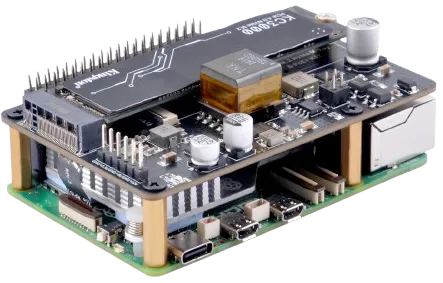
Raspberry Pi 5 with NVMe and PoE - pricey little computers
Since I wanted to utilize ARM for the bootstrap layer I ended up with a few Raspberry Pi 5’s.
In order to get NVMe and PoE support, you have to pick up additional “HATs” (Hardware Attached on Top) that sit on the Pi and connect to its GPIO headers.
This makes the per node cost quite expensive compared to equivalent x86 hardware which has a lot of this stuff out of the box
Price Guide
Section titled “Price Guide”Prices are based on time of writing, 8GB Pi5, late 2024
| Configuration | Master | Netboot | Cluster Storage | Cost |
|---|---|---|---|---|
| Pi + SD + NVMe + PoE | ✅ | ❌ | ✅ | £80+£5+£15+£22 = £122 |
| Pi + SD + NVMe | ✅ | ❌ | ✅ | £80+£5+£15 = £100 |
| Pi + SD + PoE | ✅ | ❌ | ❌ | £80+£5+£22 = £107 |
| Pi + SD | ✅ | ❌ | ❌ | £80+£5 = £85 |
| Pi + NVMe + PoE | ❌ | ✅ | ✅ | £80+£15+£22 = £117 |
| Pi + NVMe | ❌ | ✅ | ✅ | £80+£15 = £95 |
| Pi + PoE | ❌ | ✅ | ❌ | £80+£22 = £102 |
| Pi | ❌ | ✅ | ❌ | £80 |
Final Shopping List
Section titled “Final Shopping List”- Raspberry Pi 5 16GB (x1) - Control Plane node
- Raspberry Pi 5 8GB (x2) - Worker nodes
- GeeekPi P33 M.2 NVME M-Key PoE+ Hat (x3) - Enables PoE and NVMe support
- Patriot P320 128GB NVMe SSD (x3) - For important distributed/replicated data
- PNY Pro Elite microSDXC card 64GB Class 10 UHS-I U3 100MB/s A1 V30 (x3) - (optional) For persistent OS usage
Software Configuration
Section titled “Software Configuration”OS: Ubuntu Server
Section titled “OS: Ubuntu Server”
The bootstrap plane runs lightweight Ubuntu Server images on Raspberry Pi 5s. Canonical’s ARM build gives me a familiar package ecosystem, smooth PoE/NVMe support, and enough flexibility to host the PXE, DNS, Git, and Argo seed workloads that bring new hardware online.
Configuration: Cloud Init
Section titled “Configuration: Cloud Init”
Cloud-init config lives in bootstrap/netboot/assets/ubuntuserver/boot/user-data and bakes in everything needed to turn a freshly booted Pi into a k3s node plus PXE helper.
- Base OS + SSH prep: sets the hostname deterministically, installs core packages (NFS/iSCSI/XFS tooling, zstd, etc.), and regenerates SSH host keys on first boot.
- Netboot image stamping: idempotently writes the staged OS image to disk (dd/zstd) and records the hash so repeat boots skip re-flashing.
- NVMe prep for Longhorn: partitions and formats the first NVMe disk as XFS, mounts it under
/var/lib/longhorn/disks/nvme1, and enables trim. - k3s bootstrap orchestration: leader/agent election via
k3s-*-scripts, optional token fetch from the bootstrap HTTP site, installs k3s (v1.33.6+k3s1) as server or agent, and restarts until the API is ready. - TLS/PKI bootstrap: generates a local root CA, seeds cert-manager/trust-manager manifests, configures kube-apiserver OIDC flags, and publishes the CA ConfigMap for apps (plus an optional CA download site).
Orchestration: K3s
Section titled “Orchestration: K3s”
K3s is a lightweight, production-grade Kubernetes distribution designed for environments where full Kubernetes is too heavy. It bundles the core Kubernetes components into a single small binary, replaces heavier dependencies with simpler alternatives (like using SQLite by default instead of etcd), and trims out non-essential features.
Resource usage is low enough for edge devices, small VMs, and embedded systems, while still supporting standard Kubernetes APIs, Helm charts, and controllers.
Deployment: ArgoCD
Section titled “Deployment: ArgoCD”
Argo CD is a Git-driven deployment controller for Kubernetes that continuously applies the desired application state stored in a Git repository.
It watches manifests, Helm charts, or Kustomize configs and ensures the cluster matches them, handling updates, rollbacks, and drift detection automatically.
It’s widely used for GitOps workflows where Kubernetes configuration, application releases, and operational changes are all version-controlled and applied declaratively.
Workloads: ArgoCD Applications
Section titled “Workloads: ArgoCD Applications”
ArgoCD: How heroes ship
Pi-Netboot
Section titled “Pi-Netboot”This application is made of several key components:
- pi-netboot-builder - Dockerized bash script for pulling ubuntu server for Pi and processing it into a usable netboot image.
- bootstrap-http - Nginx web server that hosts the custom
cloud-initcloud config files to pre-configure the OS with at boot - tftp-server - TFTP file server for hosting the Pi’s boot partition files
- nfs-server - NFS file server for hosting the Pis root partition files
- kube-vip - A virtual IP to make sure services are always available at the same address regardless of which physical node they’re running on
Defined at src/manifests/ainur/pi-netboot.yml
Dex (OIDC)
Section titled “Dex (OIDC)”- Helm chart from dexidp with repo-side values to keep config in Git.
- Ingress at with TLS from the local CA.
- OIDC clients for Argo CD and Headlamp, matching their redirect URIs.
- CA injection via namespace labels for trust-manager bundles.
- Admin RBAC seeded via
rbac-admin-user.ymlfor initial access.
Headlamp
Section titled “Headlamp”src/manifests/ainur/headlamp.yml
- Helm chart install with Dex OIDC wiring and client IDs/secrets from values.
- Ingress with cert-manager TLS.
- Trusted CA: mounts the injected
lab-caConfigMap for outbound TLS. - Sync-wave after Dex so authentication is ready first.
Longhorn
Section titled “Longhorn”src/manifests/ainur/longhorn.yml
- Helm chart with Pi-friendly values (node selectors/taints).
- StorageClass defaulted for workloads; CSI node runs on all Pis.
- Ingress for UI/manager with local TLS.
- Backends land on the NVMe/XFS disks prepared by cloud-init.
Sidero Omni
Section titled “Sidero Omni”src/manifests/ainur/sidero-omni.yml
- Helm chart from SideroLabs with repo-side overrides.
- Ingress for the Omni UI/API with local TLS and CA injection.
- GPG/PKI assets provisioned via bundled PVC and generator manifests.
- Future Talos/PXE management to converge with the netboot stack.
Cert download site
Section titled “Cert download site”- Static site served via nginx to publish the self-signed CA and fingerprint.
- Namespace labels request trust-manager CA injection.
- Ingress/TLS terminates with the same local CA issued by cert-manager.